If you’ve ever stood in front of a vertical machining center (VMC) watching a spindle whir too fast for your delicate aluminum part or stall mid-cut because you cranked the speed too low, you know how small adjustments here can make or take away from your production run. As a supplier who’s walked alongside hundreds of machinists, fabricators, and job shop owners for years, I’ve learned that adjusting spindle speed isn’t just a button press—it’s a balance of material science, tool condition, and machine capability that keeps parts on spec and teams on schedule. Let’s break this down step by step, no fancy jargon, just the real-world knowledge we pass around our workshop every day. Vertical Machining Center

First, let’s start with why spindle speed actually matters. Think of the spindle as your machining center’s “cutting heart.” Its speed, measured in RPM (revolutions per minute), directly controls how fast the cutting edges on your end mill, face mill, or drill bit pass through your workpiece material. Too slow, and you’ll burn through tool edges, leave rough, uneven surface finishes, and risk built-up edge (BUE)—that gunk that forms when melted material sticks to the tool instead of being cleared away. Too fast, and you risk tool breakage, workpiece deflection, or even damaging the spindle itself by putting unnecessary stress on its bearings. We see this all the time with new operators who skip the basics to rush a job, only to end up with a scrapped part and a replaced tool.
Before you even touch the spindle speed controls, there are three non-negotiable prerequisites you need to have lined up. Skipping these steps is like driving without a seatbelt—it might work for a little while, but it’s a risk waiting to go wrong.
The first is confirming your machine’s capability. Not all VMCs are built the same. Some entry-level models have a maximum spindle speed of 8,000 RPM, perfect for general steel and aluminum work. Our mid-line models crank that up to 15,000 RPM for tighter tolerance jobs, and our high-performance CNC VMCs can hit 20,000 RPM and above for high-speed machining of composites or thin-walled parts. Pushing a machine beyond its rated speed isn’t just dangerous—it will void your warranty, and that’s a hassle no shop needs. I always tell new customers: check your operator’s manual first. It will list the speed ranges for every spindle configuration, including tool holding limits, and warn you about speed restrictions for heavy cuts or long tool extensions.
Second, you need to know your workpiece and tool material. This is the core of accurate speed adjustment. For example, a solid carbide end mill for 6061 aluminum will run at a totally different speed than a high-speed steel (HSS) drill for mild steel. Let’s get specific: 6061 aluminum, one of the most common materials for aerospace and automotive prototypes, typically runs at 2,000 to 6,000 RPM for roughing cuts and 5,000 to 10,000 RPM for finishing. Mild steel, like A36, runs much slower—200 to 500 RPM for roughing with HSS tools, and 600 to 1,200 RPM with carbide tools. Stainless steel (304) is trickier, usually coming in at 150 to 400 RPM for roughing, since it work-hardens easily and generates a lot of heat. If you don’t have a material-specific speed chart handy, a quick rule of thumb is to look at the tool material: carbide tools can safely run 3 to 5 times faster than HSS tools for the same material, because they hold their edge better at higher temperatures.
Third, check your tool condition and setup. A worn, chipped end mill will not perform at its rated speed. If your tool has a dull cutting edge, you’ll need to drop your speed by 15 to 25% to avoid burning the material or breaking the tool. Also, consider tool length and overhang: a long, slender tool sticking way out of the spindle will flex under load, and higher RPM will amplify that vibration. If you’re using a tool with more than 3x diameter overhang, drop your speed by 10 to 20% to prevent chatter—those unwanted wavy lines on your part surface that you have to hand-finish later.
Okay, now you’ve checked all the prerequisites—let’s get into the actual adjustment process, which depends on whether your VMC is a manual or CNC model. Most modern VMCs are CNC these days, but we still sell a good number of manual VMCs to small job shops that prefer hands-on control, so I’ll cover both.
For manual vertical machining centers, the process is straightforward, but there are a few tricks to avoid mistakes. First, locate your spindle speed controls—they’re usually a rotary dial on the control panel, or a set of up/down arrow buttons, sometimes with a digital readout showing current RPM. Before adjusting, make sure the spindle is either off or at a safe idle speed—never change speed while the tool is cutting, that’s a fast way to break a tool or damage the workpiece. Once you’re at idle, turn the dial or press the arrows to adjust the RPM. Important: don’t crank it all the way to max speed unless you’ve confirmed that’s what you need for your job. Our operators often test speeds incrementally—start 10 to 15% higher than your calculated target, then tweak up or down in small increments until you get the finish you want. Also, pay attention to how the spindle sounds: a smooth, consistent hum means you’re at a good speed; a high-pitched whine or vibration means you’re either too fast or have a tool balance issue.
For CNC vertical machining centers, the adjustment is done through the G-code program, which is more precise but requires a bit more pre-planning. First, you’ll input your target spindle speed using the S code—for example, S2500 means 2,500 RPM. This code is usually placed right after the tool change command (T01 M06, for tool 1) so the spindle speeds up as soon as the new tool is loaded. There’s also a G-code specifically for speed control: G97 sets constant RPM mode, which is what you’ll use for most milling and drilling jobs, to keep speed consistent regardless of material engagement. G96 is for constant surface speed (CSS), which is perfect for turning, but some newer VMCs support it for face milling too, adjusting speed automatically based on how far the tool is from the workpiece center. Once you input the S code, you can adjust it on the fly during a run if you need to tweak something—most CNC controls have an override dial that lets you adjust spindle speed by +/- 50% without editing the G-code, which is super useful for test cuts. Just remember that spindle speed override doesn’t work in rigid tapping mode, so double-check your control settings if you’re tapping threads.
Now, let’s talk about common mistakes we see all the time, because even experienced operators slip up. The first mistake is not accounting for diameter. When you’re milling, the cutting speed is based on the tool’s diameter—so a 1/2 inch end mill at 2,000 RPM has a different surface speed than a 1 inch end mill at 2,000 RPM. Many operators use a fixed RPM number across all tools, which can lead to poor results. Our recommendation is to calculate surface speed (SFM, surface feet per minute) first, then convert that to RPM using the formula: RPM = (SFM * 3.82) / tool diameter in inches. This formula works for almost all milling operations, and it’s the standard we teach every operator who works with our machines. Another common mistake is forgetting to check tool balance. Unbalanced tools, especially at high RPM over 10,000, will cause massive vibration, leading to part errors and even spindle damage. We always recommend balancing tools after tool changes, and we sell high-quality collets and tool holders that reduce imbalance by 30% compared to standard holders. One more mistake: rushing through test cuts. A quick test cut of 1 to 2 inches can tell you if your speed is right—look at the chip formation: thin, curly chips mean good speed and feed; short, broken chips mean too fast or too slow; blue, burnt chips mean you’re running too fast or not feeding enough.
Once you’ve adjusted your spindle speed, it’s important to verify that the change worked and that you’re getting optimal results. The first check is surface finish: run your finger across the part—if it’s smooth and uniform, that’s a good sign. If it’s rough with chatter marks, drop your speed by 10 to 15% or adjust your feed rate. Next, check tool wear after the cut: if the cutting edges look dull or have BUE, you need to increase your speed slightly. If there’s excessive tool chipping, you’re running too fast and need to slow down. Also, listen to the machine during the cut—an irregular noise or vibration means you have a speed or setup issue, even if the surface looks okay.
Over the years, we’ve seen that the best machinists don’t just follow a chart—they develop a feel for their machine and their workpieces, adjusting speed as they go based on real-time feedback. For example, a job shop we work with that does custom aluminum prototypes used to struggle with finish on thin-walled parts, until they started dropping spindle speed by 10% and increasing feed slightly for parts under 1/8 inch thick—they cut their scrap rate by 20% in a month. Another customer, a large aerospace fabricator, switched from fixed RPM to SFM-based speed calculation and extended their carbide tool life by 35%, because they were no longer over-speeding tools for small diameter cuts.
If you’re still feeling unsure about adjusting spindle speed, or you’re dealing with a specific challenge like high-speed machining, thread tapping, or working with exotic materials like titanium or Inconel, our team is here to help. We design and build our vertical machining centers to be intuitive for operators, and we offer on-site training for new customers to walk through speed adjustment, tool setup, and all the little tricks that make production run smoothly. Whether you’re a small shop with one VMC or a large facility with a full line of machining equipment, we can work with you to optimize your spindle settings, solve any setup issues, and help you get the most out of your machine.
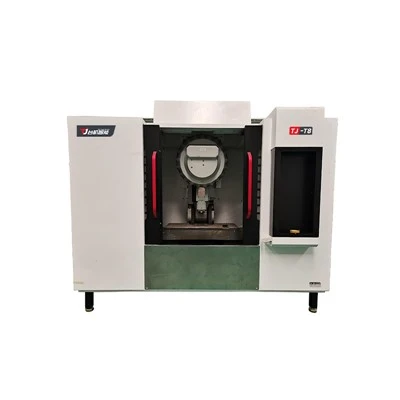
If you’re ready to upgrade your current VMC or learn more about our line of vertical machining centers, our team is available to discuss your specific production needs. We’re always happy to walk through any questions you have about machine capabilities, speed ranges, or custom solutions for your parts.
Five Axis Machining Center References
Machine Tool Spindle Technology: Principles and Applications. Industrial Press.
Machinery’s Handbook: Spindle Speed and Feed Rate Calculations. Industrial Press.
CNC Machining Fundamentals: Operation and Programming. Goodheart-Willcox.
Cutting Tool Applications Handbook. American Machinist.
Guangdong Taiji Intelligent Equipment Co., Ltd.
With abundant experience, we are one of the most professional vertical machining center manufacturers and suppliers in China. Please feel free to buy cheap vertical machining center for sale here from our factory. For price consultation, contact us.
Address: Room 107, Building 15, No. 911 Jian’an Road, Chang’an Town, Dongguan City, Guangdong Province
E-mail: sale@gdtaijicnc.com
WebSite: https://www.gdtaijicnc.com/
